Taskbar colourer and organizer.
|
|
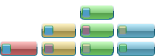
- Colour buttons depend on tasks or titles.
- Collect tasks in groups.
- Reorder tasks into groups and taskbar.
- Quick access into groups.
- Live icons. You see a cnanging of icons into groups, when groups are hidden.
- Show information about tasks.
- Can open new tasks from existed.
|
|
|
OS: WindowsNT 4.0, Windows 2000, Windows XP, Windows 2003, Windows Vista.
|
Here are main window of TaskBow with setting and modified taskbar.

|
- Quick taskbar organizer.
You can group and ungroup tasks in TaskBow by mouse, using drag'n'drop.
Just keep a task by mouse and drag it in new position. Special cursor will be show direction where released the task will be dropped.
To add a task in a group, drag button to a group or to a task.
To ungrop, just drag it to taskbar and release mouse.
- Quick group access.
In Windows XP you can get access to buttons in group by click in task button, and then you can choose task you need.
TaskBow give you quick access to group by moving mouse in group:

As you see, "parent" task of group can show, that "child" task is active - Parent task is looks like semi-active. So, there is a three states of tasks:
 Usual. Usual.
 "Parent" task - "New Folder" is active. "Parent" task - "New Folder" is active.
 "Child" task is active. "Child" task is active.
So, you can see, which task is active. Moreover, you can interact with tasks thru Parent task.
Look at last picture: if you click in "popped" area (first pointer) you'll activate Parent task.
If you click in "pushed" area (second pointer) you'll minimize active Child task.
- Quick group info.
 You can see number of tasks in group. You can see number of tasks in group.
 You can see current state of tasks without activation of it. You can see current state of tasks without activation of it.
|
- Program info
From context menu you can select menu item "About ... ":

and you'll see program info, something like this:

- Run more program
From context menu you can run one more instance of presented program:

|
Classification: [+] new [-] fix
You can view full list of changes here.
- Task context menu: Add/Edit add new record for existing colour assignment.
- Task assignment window: Checkbox did not work for preview.
- Default colours settings: def. colours setting did not stored.
...
|